Police Radar - Camera Detector
- 4.4
- Rating
- 1.00M
- Installs
- Free
- Price
 Analysis by App-foxy
I tested Police Radar - Camera Detector as a practical driving companion rather than treating it like a full navigation replacement. Its purpose is straightforward: help drivers stay aware of fixed and portable speed-radar locations while they are on the road. That narrow focus is also its main appeal. I would not install it expecting route planning, traffic intelligence, or a complete driving assistant. I would use it as an extra layer of awareness alongside the navigation tool I already prefer.
The app comes from M.I.R. and sits in the Auto & Vehicles category. It is free to install, aimed at Teen users, and has reached more than a million installs. Its average rating is 4.4 from roughly sixteen thousand ratings, which suggests that many drivers find the basic idea useful, even though a rating alone cannot tell you whether it suits your exact driving habits.
How it works in a shared household
The most useful household scenario is a shared phone or a family car where different people take turns driving. One person may normally use a navigation app, while another may prefer a simpler screen that concentrates on radar awareness. In that situation, this app can serve as a dedicated driving aid without forcing everyone to change their preferred map service.
You May Also Like

 Blood Strike: 2.5 Anniversary
Blood Strike’s Loadouts Turn Every Drop Into a Tactical Gamble
A close look at Blood Strike’s custom loadouts: how fast access to signature weapons reshapes its battle royale rhythm, rewards preparation, and narrows the gap between fights.

 Pandora - Music & Podcasts
Pandora’s Music Is Easy to Start, but Harder to Recover
Pandora’s strength is its low-effort path from a seed to a station. Its weak spot is how much confidence it asks you to place in connection, setup, and quiet recovery.

 8 Ball Pool
 Is Built on Rivalries, Rematches, and Routine
A close look at the rivalries, rematches, shared routines, and unanswered safety questions that turn a quick pool match into a persistent mobile community.

 Samsung Music
’s Quiet Strength Is Playing What You Already Own
Its reach comes less from spectacle than from dependable access to a personal library. That simplicity is both the app’s strongest retention engine and its ceiling.

 AccuWeather: Weather Radar
AccuWeather Review: A Quick, Clear Forecast for Everyday Decisions
For everyday plans, the best forecast is the one you can understand quickly. AccuWeather makes rain timing, radar, and local conditions easy to act on, with a few trade-offs.

 Hill Climb Racing
Why Hill Climb Racing Still Turns Crashes Into One More Run
A tiny car, a bumpy hill and one more upgrade: Hill Climb Racing keeps resurfacing because its simple chaos makes every near-miss feel personal.
More From Our News Desk
View All News


I can imagine using it before a weekend trip: the driver checks the route, opens the radar app, and confirms that the phone is positioned where alerts can be noticed without becoming a distraction. A passenger can help with the initial setup, but the driver should not be adjusting the screen while moving. That small division of responsibility matters more than it may seem, especially when several people share one device and each person assumes somebody else configured it correctly.
For a household with multiple drivers, the app is best treated as a common reference tool, not as a personal account system. I would not assume that one person's preferences, saved locations, or alert choices automatically make sense for everyone else. Before handing over the phone, I would check the active settings and make sure the next driver understands what the alerts mean. This avoids a familiar problem with shared devices: a setting chosen for one person's commute quietly remains active for another person's longer journey.
The app also makes sense in a vehicle used by parents and older teenagers, but only when everyone agrees that it supports attentive driving rather than replacing it. Radar information should encourage a driver to observe the road and posted limits, not invite constant checking of the display. I would keep the phone mounted, set things before departure, and leave route changes or detailed searches to a passenger.
Setting expectations before the first drive
The first run should be treated as a short familiarization drive, not as a test during a busy trip. I would open the app while parked, look at how locations are presented, and learn how it communicates an approaching radar point. That is particularly important when the phone is shared: a new user should not have to guess whether a visual marker, sound, or other notification is the important signal while traffic is moving.
I would also compare what the app shows with the road itself. A radar-warning application depends on location information being useful for the driver's route, but no alert tool should be treated as an authority that overrides signs, temporary restrictions, roadworks, or changing conditions. The practical boundary is simple: use the app as supplementary information, and follow the actual road rules first.
One of my strongest recommendations is to separate setup from driving. If the phone is being passed between family members, make a quick handover routine: charge it, mount it, confirm the app is open, and agree who will handle any changes. This is more reliable than expecting a driver to troubleshoot after starting the engine.
Because the app is free, it is easy for a household to try it without committing money immediately. However, the presence of optional in-app purchases means I would still review the purchase screen before letting a child or another family member explore it freely. Items are listed in the range of $0.99 to $5.49 each. That does not make the app unsuitable for shared use, but it does make account boundaries worth discussing in advance.
Coordinating between drivers
Coordination is where a simple radar tool can become genuinely useful. A family member who drives the same route every day may notice that the app fits that routine well, while someone taking unfamiliar roads may need a full navigation app at the same time. I would not force everyone in the household into one workflow. Instead, I would agree on what each person expects the app to do.
For a regular commute, the driver may want a quiet background aid and minimal interaction. For a holiday journey, the passenger could compare the radar information with the planned route and help the driver stay focused. For a shared company or family vehicle, the person who prepares the phone should explain the setup briefly rather than assuming that the next user will understand it automatically.
A useful, less obvious habit is to make a distinction between “the app is running” and “the app is being actively monitored.” Those are not the same thing. A driver can have the application open while concentrating fully on the road, but should not keep looking down to verify every location. I would rely on the app's alerts only as a prompt to remain attentive, then return my attention immediately to traffic, signs, and lane position.
Another practical trade-off appears when a household uses different navigation apps. This radar tool may complement a preferred map service, but running several driving applications can make the phone feel crowded and can complicate audio or screen behavior. If a driver finds that switching between apps creates more distraction than awareness, the safer choice is to simplify the setup. A radar warning is not valuable if the overall arrangement makes driving harder.
I would also avoid passing around informal claims such as “the app always catches every camera.” That is an unrealistic standard for any location-based warning service. A better household rule is to treat its information as a reminder to drive legally and cautiously, never as permission to relax attention. This distinction is especially important when an inexperienced driver is borrowing the vehicle.
Age, trust, and responsible use
The Teen content rating is relevant when the app is installed on a family phone. A teenager may be old enough to use it, but age alone does not establish that the person understands the responsibility involved. I would explain that the application is not a way to drive faster or to challenge enforcement. Its sensible role is awareness: notice the road environment, observe limits, and avoid relying on a screen for judgment.
I would also be clear about privacy and account boundaries without inventing controls the app may not have. If the phone belongs to a parent, the parent should decide who can install optional items and whether the device is used for driving at all. If it belongs to a teenager, a conversation about safe mounting, no handling while moving, and passenger assistance is more useful than simply saying “use it carefully.”
Trust works both ways. A parent should not assume that an alert application makes supervision unnecessary, and a teenager should not interpret its presence as approval to focus on radar locations instead of the road. In my view, the right agreement is behavioral rather than technical: configure it before driving, keep the phone stable, obey signs, and stop if the app becomes distracting.
The Teen rating also means I would consider the context in which a younger passenger uses the device. A child can help a driver as a passenger only if that role is clearly limited and does not turn into constant screen watching. The passenger may be able to assist with basic coordination, but the driver remains responsible for safe decisions. That boundary is important in a shared household because children often want to interact with whatever is open on the phone.
There is a wider trust issue with radar applications. Some drivers may expect absolute precision and become frustrated when road conditions differ from what the display suggests. I prefer to judge the app by whether it adds a useful reminder without encouraging false confidence. If a family member cannot maintain that mindset, I would recommend skipping this type of tool and relying on road signs and a simpler navigation setup.
What the current version means in daily use
The current release is version 3.86, and the app supports devices running Android 7.0 or later. That makes it accessible on many older Android phones, which is helpful for a shared household device that is no longer used as someone's main phone. Still, an older handset may have a smaller screen, weaker battery life, or less comfortable mounting options. Compatibility is not the same as convenience.
I would test the phone in the actual vehicle before a long trip. Check whether the display is readable in daylight, whether the mounting position blocks anything important, and whether the device remains stable over bumps. These are not glamorous details, but they determine whether a radar tool is helpful or becomes a nuisance. A phone that overheats, slides around, or requires frequent attention is a poor driving companion regardless of the app's purpose.
The app's focused design can be an advantage over a large navigation suite. A full map application may offer route guidance, traffic information, business searches, and many other layers that some drivers do not need on a familiar journey. Police Radar - Camera Detector is more appealing when the driver wants a narrower job. On the other hand, a conventional navigation app is the better choice when the journey depends on rerouting, turn-by-turn directions, live congestion information, or a broad view of the road network.
I would not replace a trusted navigation app with this one. The comparison is not really “which app does everything better?” It is “do I need an additional radar-awareness layer?” For a driver who already has a stable navigation workflow and wants a focused supplement, the answer may be yes. For someone who wants one application to handle the entire trip, this is likely too specialized.
The optional purchase range also changes how I would evaluate it over time. Since the basic installation is free, I would first use the core experience on ordinary drives and decide whether it adds value before considering anything extra. I would not buy an item simply because the app is installed on a family device. Each driver should understand what is being purchased and why it improves their particular use case.
Situations where I would skip it
I would skip this app if I tend to fiddle with my phone while driving, even if the intended purpose is safety-related. No warning system compensates for divided attention. I would also skip it if I rarely drive and do not want to learn another interface, or if my existing navigation setup already provides all the awareness I need without making the dashboard more complicated.
It may also be the wrong choice for a driver who needs dependable route guidance more than radar information. Someone navigating unfamiliar city streets, coordinating several stops, or dealing with frequent traffic changes will probably get more practical value from a full navigation solution. This app's strength is its narrow purpose, and that same narrowness is a limitation when the trip requires broader assistance.
I would be cautious about using it on a device shared with someone who changes settings often or makes purchases without checking first. The household can reduce that friction with a simple handover routine, but the app itself should not be treated as a substitute for clear responsibility. Shared-device use works best when one person prepares the phone and the driver knows what is active.
Finally, I would skip it if I expected perfect coverage or treated every alert as a guarantee. A responsible driver must still read signs, respect temporary restrictions, and adapt to conditions that no location-based tool can fully represent. The app can support awareness, but it cannot make decisions for the person behind the wheel.
My household verdict
After using it with a shared-use mindset, I see Police Radar - Camera Detector as a focused, affordable addition for drivers who want extra awareness of radar locations without replacing their normal navigation habits. Its free entry point, broad Android compatibility, and large installed user base make it easy to try, while the 4.4 average indicates that the concept works well for many people.
My recommendation comes with clear conditions: configure it while parked, mount the phone securely, keep the driver from interacting with the screen, and explain to younger or occasional drivers that alerts never override road signs or judgment. In a household, the best results come from coordination rather than from assuming that one setup suits everyone.
For a regular commuter or a family sharing one vehicle, I think it is worth testing as a quiet companion to a preferred map app. For someone seeking complete navigation, detailed trip planning, or a hands-off guarantee, I would choose a different type of tool. Its real value is not helping anyone evade responsibility; it is giving a driver one more prompt to stay alert and drive within the rules.
FAQs for Police Radar - Camera Detector
01How accurate is Police Radar - Camera Detector in identifying speed cameras?
Police Radar - Camera Detector uses a combination of GPS and up-to-date database information to identify speed cameras. While it is generally accurate, its effectiveness can vary depending on location and the availability of updated data. Users are encouraged to keep the app updated and contribute to the database for improved accuracy.
02Does Police Radar - Camera Detector work offline?
The app primarily relies on GPS and an online database to function accurately, so it works best with an internet connection. However, some features like GPS-based alerts may still function offline, although they might be less reliable without real-time data updates.
03Is Police Radar - Camera Detector legal to use?
The legality of using Police Radar - Camera Detector depends on your location. In some regions, using radar detectors or similar apps is restricted or prohibited. Users should check local laws and regulations to ensure compliance before using the app while driving.
04What are the app’s main features?
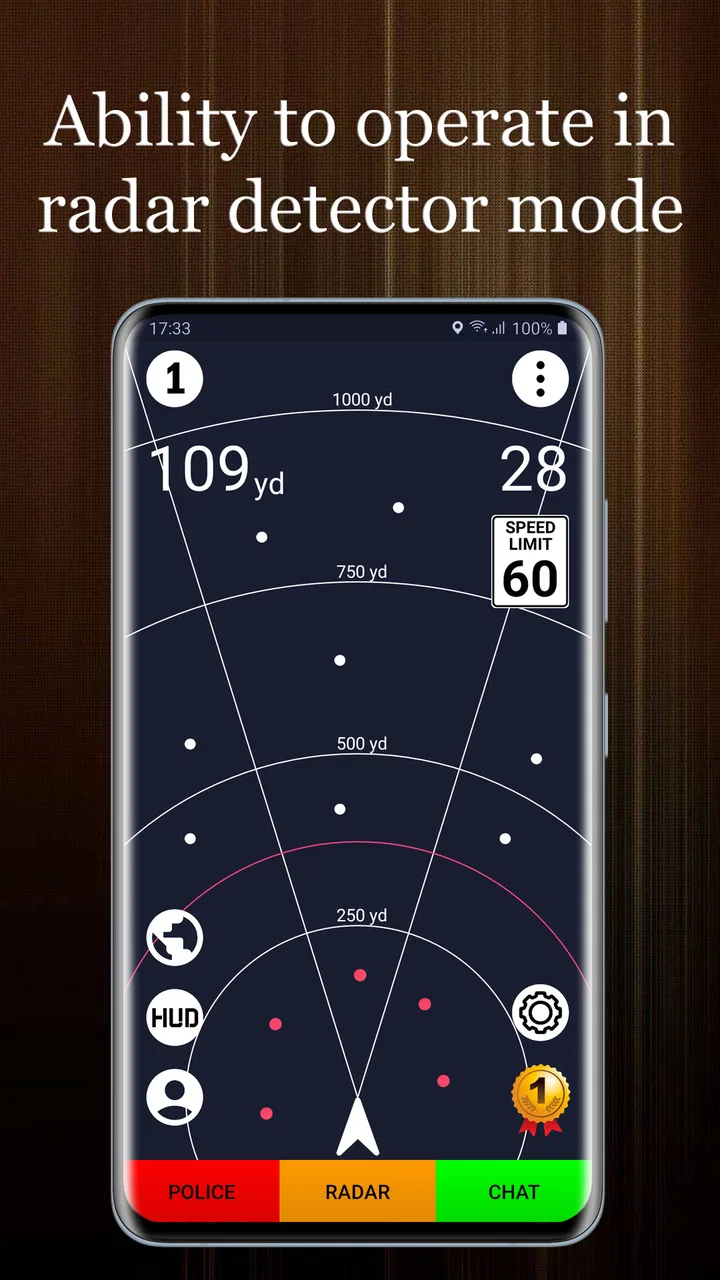
Police Radar - Camera Detector offers features such as real-time alerts for speed cameras, radar detection, and traffic updates. It includes a user-friendly interface, allows user reporting of new cameras, and provides a comprehensive map view to help drivers navigate safely and avoid fines.
05Does using the app drain my phone’s battery quickly?
Like many GPS-based apps, Police Radar - Camera Detector can be relatively demanding on your phone’s battery. To minimize battery usage, it's recommended to use the app with a charger or power bank and adjust settings to lower battery consumption when possible.
Pros
- User-friendly interface with intuitive navigation.
- Real-time alerts for speed cameras and traps.
- Customizable settings for alert types.
- Regular updates improve accuracy and reliability.
- Battery-efficient
- runs smoothly in background.
Cons
- Requires a stable internet connection.
- Some features locked behind a paywall.
- Occasional false alerts can occur.
- Limited functionality in rural areas.
- Ad interruptions in the free version.

Police Radar - Camera Detector
Gallery